Say I’m signing up for a new app and I type brandonpark into the username field. By the time I’ve moved on to the password, the form already says the name is taken. Somewhere there’s a table with millions of usernames, and it just checked mine against all of them faster than I could tab to the next field.
I wanted to know what actually makes that fast. Two data structures come up for this kind of question. A B-tree tells you exactly where something is. A Bloom filter tells you, very cheaply, when something is definitely not there. They attack the same problem from opposite ends, and the interesting part is knowing which one to reach for.
What happens without an index
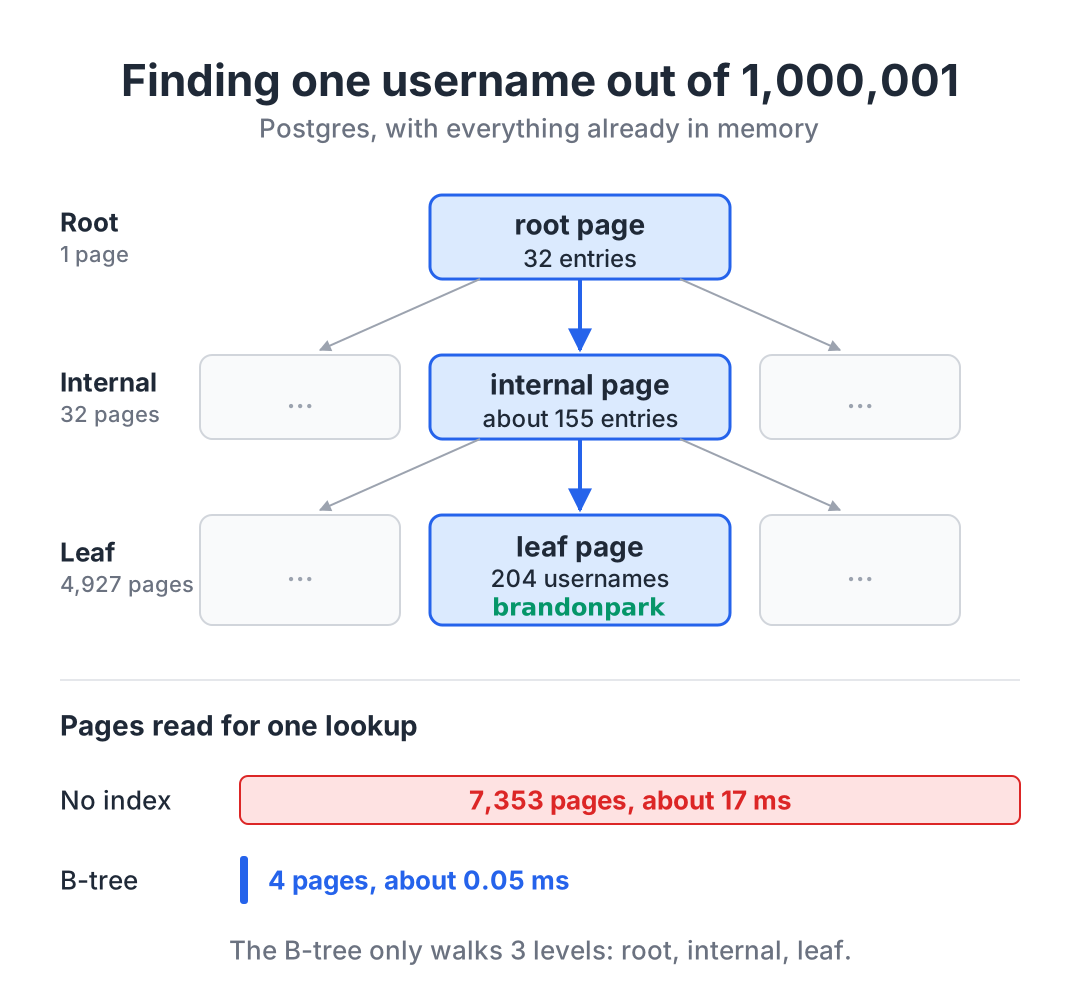
To see the problem, I loaded 1,000,001 usernames into a Postgres table and asked whether brandonpark was one of them:
SELECT 1 FROM users WHERE username = 'brandonpark';With no index on username, Postgres has no idea where that name might be, so it reads the whole table. EXPLAIN ANALYZE showed it touching all 7,353 pages (Postgres stores tables in 8 KB pages by default) and taking about 17 ms, with every page already sitting in memory. That’s fine for one lookup, but it gets expensive when every sign-up has to do it.
Then I added an index:
CREATE UNIQUE INDEX users_username_key ON users (username);The same query now read 4 pages and took about 0.05 ms. Same table, same question, roughly 1,800 times fewer pages. That index is a B-tree.
How they’re used today
B-trees are under a lot of the databases you’ve probably used. In Postgres, CREATE INDEX builds one unless you ask for something else [1], and every unique constraint and primary key is enforced by one [2]. MySQL’s InnoDB goes further: its indexes are B-trees [3], and the table itself lives inside the primary key’s B-tree, with every other index pointing back into it [4]. SQLite stores every table and every index as its own B-tree [5]. Even DynamoDB, which doesn’t look like a relational database from the outside, keeps the data on each of its storage replicas in a B-tree [6].
Bloom filters show up in a different kind of database. Cassandra and RocksDB handle writes differently from a B-tree. New writes go to memory first and then get flushed out as new files, so the data for one key can end up spread across several files [7] [8]. That moves the cost to reads: finding out a key isn’t there could mean opening every one of those files. So both keep a Bloom filter per file and skip any file that definitely doesn’t have the key [9] [10], the same pattern Google described for Bigtable [11]. Postgres also ships a bloom index type, which I’ll come back to below [12].
B-trees: finding the exact answer
A B-tree is a sorted, balanced tree where each node is a whole page of keys instead of a single key.
The width is the whole point. A binary search tree over a million usernames would be about 20 levels deep, and if every level meant reading a page, that’s 20 page reads per lookup. A B-tree packs hundreds of keys into each page, so it stays shallow. Here’s what the index on my 1,000,001 usernames looked like, using Postgres’s pageinspect extension:
| Level | Pages | Entries per page |
|---|---|---|
| Root | 1 | 32 |
| Internal | 32 | about 155 |
| Leaf | 4,927 | 204 |
Finding brandonpark means reading the root, following one of its 32 pointers to an internal page, following one of that page’s pointers to a leaf, and checking the leaf. The query plan counted 4 pages: those three levels plus one more. At this key size, three levels top out somewhere around five million usernames, and a fourth level would push that past 700 million, because each new level multiplies the capacity by the number of entries per page. Almost all of the index is leaves: 4,927 of 4,960 pages in mine, which lines up with the Postgres docs saying that typically over 99% of pages are leaf pages [13].
Because the keys are sorted, the same B-tree also answers range questions. Asking for every username between brandon and brandoo used the same index and came back already in order, with no sort step:
SELECT username FROM users
WHERE username >= 'brandon' AND username < 'brandoo'
ORDER BY username;
Postgres’s docs list <, <=, =, >=, >, BETWEEN, IN and sorted output as things a B-tree index can serve [1]. A hash index can only do equality [1], and only B-tree indexes can be unique [2]. When I tried to create a unique hash index anyway, Postgres refused with access method "hash" does not support unique indexes. That uniqueness is what makes “is this username taken?” the database’s job and not just the app’s: a second insert of brandonpark failed with duplicate key value violates unique constraint.
The costs are real, though:
- Every write updates the index too. Inserting 200,000 rows took about 0.38 seconds without a unique index and about 0.91 seconds with one, roughly 2.4 times as long. The Postgres docs put it plainly: indexes add overhead to the database system as a whole [14].
- They take space. The index on my usernames was 39 MB, sitting next to a 57 MB table.
- Full pages have to split. When a leaf can’t fit a new entry, Postgres splits it, and splits can cascade up the tree [13].
Bloom filters: knowing what’s definitely not there
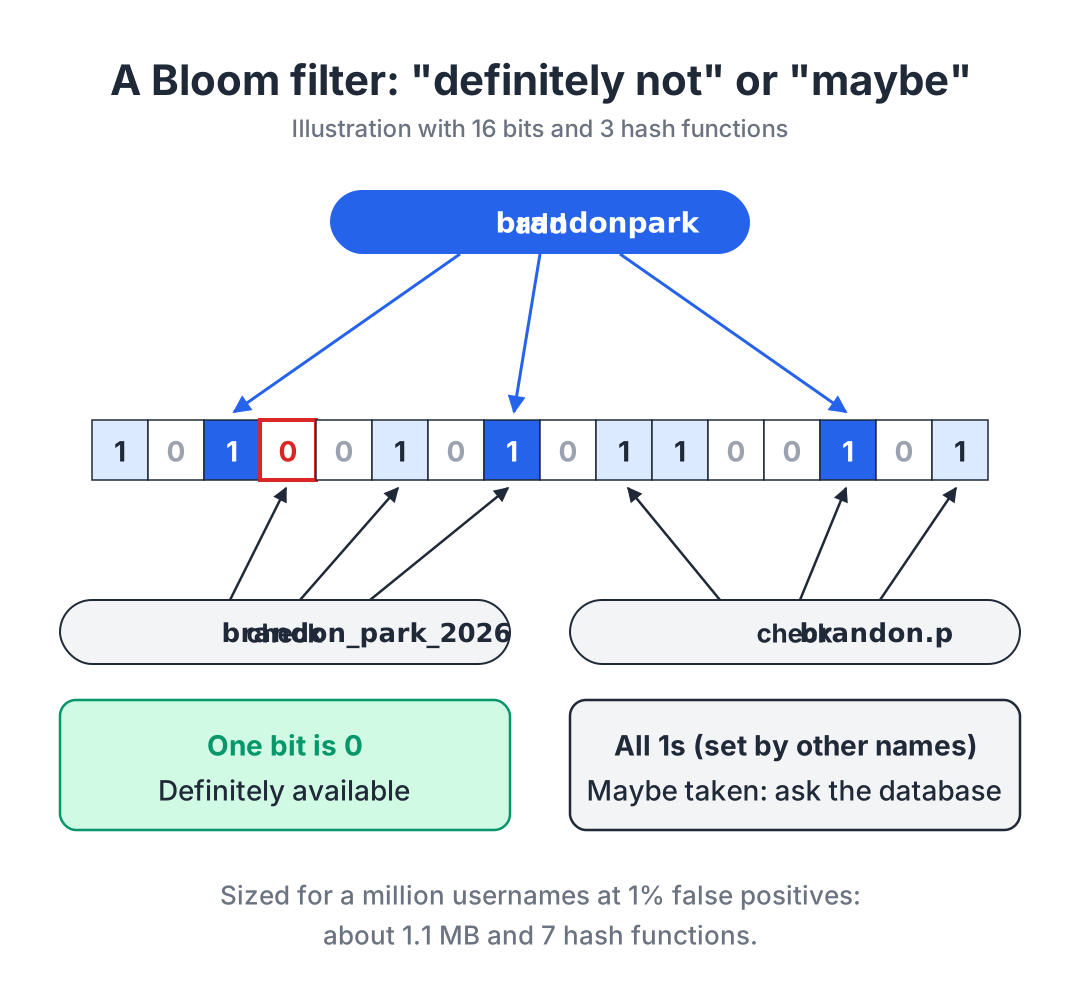
A Bloom filter gives up the exact answer in exchange for being tiny. It’s an array of bits plus a few hash functions. To add a name, you hash it k different ways and set those k bits to 1. To check a name, you hash it the same way and look at those bits. If any of them is 0, the name was never added. If they’re all 1, the name was probably added, but those bits might have been set by other names.
So it answers “definitely not” or “maybe,” never “definitely yes.” It can give false positives, but never false negatives [15].
Here’s the whole thing in Python:
import hashlib
import math


class BloomFilter:
    def __init__(self, expected_items, false_positive_rate):
        self.size = math.ceil(-expected_items * math.log(false_positive_rate) / math.log(2) ** 2)
        self.num_hashes = round(self.size / expected_items * math.log(2))
        self.bits = bytearray(math.ceil(self.size / 8))

    def _positions(self, item):
        digest = hashlib.sha256(item.encode()).digest()
        h1 = int.from_bytes(digest[:8], "little")
        h2 = int.from_bytes(digest[8:16], "little")
        return [(h1 + i * h2) % self.size for i in range(self.num_hashes)]

    def add(self, item):
        for pos in self._positions(item):
            self.bits[pos // 8] |= 1 << (pos % 8)

    def might_contain(self, item):
        return all(self.bits[pos // 8] & (1 << (pos % 8)) for pos in self._positions(item))
The size and the number of hash functions come from the standard formulas. For n items and a target false positive rate p, you want m = −n·ln(p) / (ln 2)² bits and k = (m/n)·ln 2 hash functions [15]. Rather than running 7 separate hash functions, the code takes one SHA-256 digest and derives all 7 positions from two pieces of it.
from bloom import BloomFilter

usernames = BloomFilter(expected_items=1_000_001, false_positive_rate=0.01)
usernames.add("brandonpark")

print(usernames.might_contain("brandonpark"))        # True
print(usernames.might_contain("brandon_park_2026"))  # False
Sized for 1,000,001 usernames at 1%, that filter is 9,585,068 bits (about 1.1 MB) with 7 hash functions. I loaded all 1,000,001 usernames into it, then checked a million names I knew weren’t there. 10,061 came back as “maybe,” a false positive rate of 1.006%, right on target. None of the real usernames came back as “definitely not.” For comparison, the raw usernames alone are about 20 MB, and the B-tree index was 39 MB.
The costs:
- “Maybe” always needs a real check behind it. A Bloom filter can’t be your source of truth.
- You can’t delete. Clearing a bit might erase a different name that hashed to the same spot [15]. If someone deletes their account, their name stays “maybe taken” until you rebuild the filter. Medium ran into this at scale. They used Bloom filters to hide writers you’d muted, and since nothing could be removed, unmuting a writer didn’t bring them back. They eventually replaced their filters with direct database queries and reported the new setup as ten times cheaper, while noting their filters had grown out of proportion [16].
- You size it up front. The bit count is fixed when you create it. Put in more items than you planned for and the false positive rate climbs, because more of the bits are already 1 [15]. Lowering the rate costs memory: Cassandra’s docs note that a 1% target needs about three times the memory of a 10% one [9].
- It only answers one question. It can’t list what’s inside, answer a range, or give you the record back. RocksDB, for example, only uses its whole-key filters for point lookups [10].
When to use which
The way I think about it:
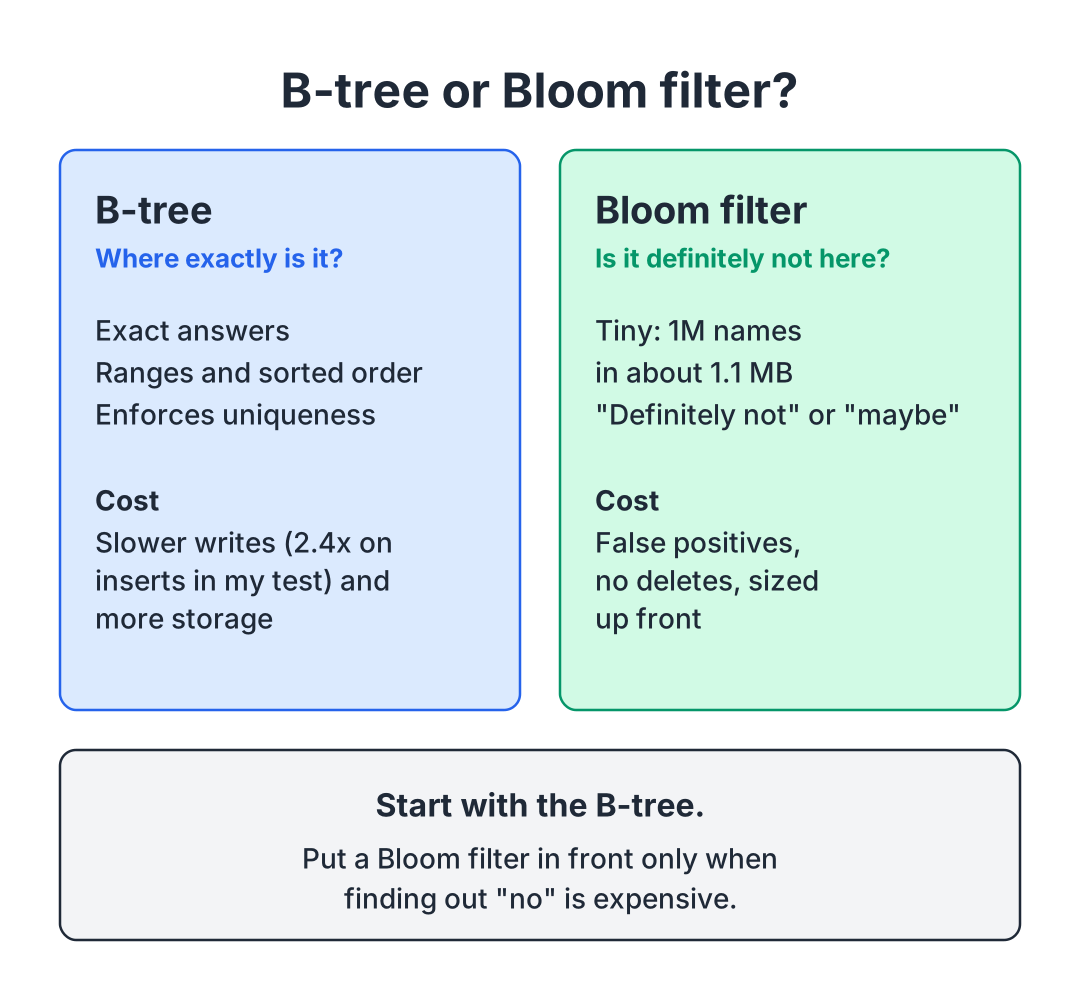
Start with the B-tree. For “is this username taken?” on one Postgres database, the unique index already answers in about 4 page reads, and it’s the same thing that stops two people from registering the same name. You don’t need anything else.
Add a Bloom filter in front only when finding out “no” is expensive. That’s why Cassandra and RocksDB have them: their data for a key can be spread across many files, and a cheap “definitely not” saves opening each one. A B-tree database like Postgres doesn’t have that problem for a single lookup, because the B-tree already points to the one place the key could be.
Use a Bloom index when you’d otherwise need a pile of B-trees. Postgres’s docs spell out this trade-off for their bloom index. For a table with many columns that gets queried on arbitrary combinations of them, one bloom index can stand in for many B-tree indexes. A B-tree is still faster, the bloom index only handles equality, and every match has to be rechecked against the real row [12].
Skip it when you need to delete, list, or count. That’s where Medium’s filters fell over.
It’s tempting to put a Bloom filter in front of the username check anyway. But you’d be adding a second copy of your data that has to be updated on every sign-up and can never forget a deleted account, to save a lookup that already takes about 0.05 ms.
| B-tree | Bloom filter | |
|---|---|---|
| Question it answers | Where exactly is this key? | Is this key definitely not here? |
| Kind of answer | Exact | ”Definitely not” or “maybe” |
| Ranges and sorted order | Yes | No |
| Can enforce uniqueness | Yes | No |
| Deletes | Yes | No (standard filter) |
| Size for 1M usernames (my test) | 39 MB index | About 1.1 MB at 1% false positives |
| Main cost | Slower writes, more storage | False positives, no deletes, sized up front |
Key takeaways
- A B-tree is wide, not binary. Hundreds of keys per page is why a million rows fit in three levels.
- One B-tree gives you exact lookups, ranges, sorted output and uniqueness, at the cost of slower writes and extra storage.
- A Bloom filter only tells you “definitely not” or “maybe.” In exchange it’s tiny: a million names in about 1.1 MB at 1% false positives.
- Put a Bloom filter in front of something only when finding out “no” is expensive, and don’t use one if you need to delete or list what’s in it.
Back to the sign-up form. On a Postgres-backed app, that instant “taken” can come straight from the unique index, three levels down, and that same index is what guarantees nobody else grabs the name a second later.
Sources
- PostgreSQL Global Development Group, “Index Types,” PostgreSQL 18 Documentation. https://www.postgresql.org/docs/current/indexes-types.html
- PostgreSQL Global Development Group, “Unique Indexes,” PostgreSQL 18 Documentation. https://www.postgresql.org/docs/current/indexes-unique.html
- Oracle, “The Physical Structure of an InnoDB Index,” MySQL 8.4 Reference Manual. https://dev.mysql.com/doc/refman/8.4/en/innodb-physical-structure.html
- Oracle, “Clustered and Secondary Indexes,” MySQL 8.4 Reference Manual. https://dev.mysql.com/doc/refman/8.4/en/innodb-index-types.html
- SQLite, “Database File Format.” https://www.sqlite.org/fileformat2.html
- Mostafa Elhemali et al., “Amazon DynamoDB: A Scalable, Predictably Performant, and Fully Managed NoSQL Database Service,” USENIX ATC 2022. https://www.usenix.org/system/files/atc22-elhemali.pdf
- Apache Cassandra, “Storage Engine.” https://cassandra.apache.org/doc/latest/cassandra/architecture/storage-engine.html
- RocksDB Wiki, “RocksDB Overview.” https://github.com/facebook/rocksdb/wiki/RocksDB-Overview
- Apache Cassandra, “Bloom Filters.” https://cassandra.apache.org/doc/latest/cassandra/managing/operating/bloom_filters.html
- RocksDB Wiki, “RocksDB Bloom Filter.” https://github.com/facebook/rocksdb/wiki/RocksDB-Bloom-Filter
- Fay Chang et al., “Bigtable: A Distributed Storage System for Structured Data,” OSDI 2006. https://storage.googleapis.com/gweb-research2023-media/pubtools/4443.pdf
- PostgreSQL Global Development Group, “bloom,” PostgreSQL 18 Documentation. https://www.postgresql.org/docs/current/bloom.html
- PostgreSQL Global Development Group, “B-Tree Indexes,” PostgreSQL 18 Documentation. https://www.postgresql.org/docs/current/btree.html
- PostgreSQL Global Development Group, “Indexes,” PostgreSQL 18 Documentation. https://www.postgresql.org/docs/current/indexes.html
- Andrei Broder and Michael Mitzenmacher, “Network Applications of Bloom Filters: A Survey,” Internet Mathematics 1(4), 2004. https://www.eecs.harvard.edu/~michaelm/postscripts/im2005b.pdf
- Raphael Montaud, “Engineering stories behind the Medium Daily Digest Algorithm: Part 2,” Medium Engineering, 2025. https://medium.engineering/engineering-stories-behind-the-medium-daily-digest-algorithm-part-2-c977ad0b134f